Followers

Windows Azure - No Kidding

Last year when ScottGu moved over to the Azure group and brought the ASP.NET and IIS teams with him, I'll be frank, I wasn't a fan. I didn't really appreciate Azure or its first iteration. The management portal was obtuse and confusing to use, the service was primarily a PAAS (Platform as a Service) offering and focused on (I thought) confusing terms like Cloud Services and slow deployments. The underlying infrastructure was strong but the developer experience didn't feel "right" to me. I really wasn't feeling it.
So I continued to work on ASP.NET and Visual Studio 2012 and the things that were interesting to me. Then, some months ago Scott and some folks showed us the concepts for the new experience and the new management stuff. It clicked. I saw that Scott and his team "gets" it. I started working with it, giving feedback and filing bugs. We had weekly full-day long team app-building sessions. One particular day I sent 52 different pieces of feedback to the Portal team.
I've talked before about how sometimes development on a platform can be "death by a thousand tiny cuts." It doesn't hurt in general but the little things poke at you. That's not the case with Windows Azure and this release. I'm not embarrassed to say I work for the Azure Team now, as it is pretty darned sweet.
Check out Scott's post but I'll mention a few things that are new just to make the point for you that Azure is something you'll want to check out now.

New Administration Portal and Tools

The management portal has been completely redone with a focus on usability and speed. It works on all browsers but the best part is that it's actually using a REST-based management API so anything you can do on the portal you can do from the API.
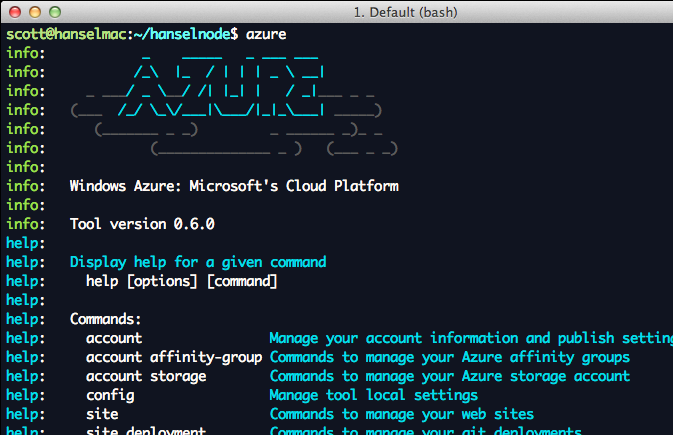
There are command line tools to talk to the REST API so you can automate anything you like from both PowerShell on Windows or Bash on Mac and Linux. If you go to the Downloads page on the Azure site you can get .NET, node.js, PHP, Java or Python tools for Windows, Mac and Linux.
Just to make the point, I'll use my Mac and download the Mac SDK on a fresh system. You can do anything from the command line be it in PowerShell or Bash. If I'm on Linux and I have npm, I can just
sudo npm install azure -g
And there's lots of stuff to explore.
The Azure Command Line on a Mac
Freaked out yet? You should be. ;) The Azure SDK is also open source under Apache 2 and available on GitHub.
Azure SDK on a Mac
After the install is done I'm sent to a "what's next" page that shows me how to get node, PHP or Python running (Given that I'm on a Mac). I'll install node.js and git, then I'll make a node.js application on Azure on my Mac.
Now, my point isn't about node nor is it about Macs. It's about choice and it's about the ability to build what you want the way you want it with the tools that make you happy.
I'll make a Web Site...
Creating a node application for Azure
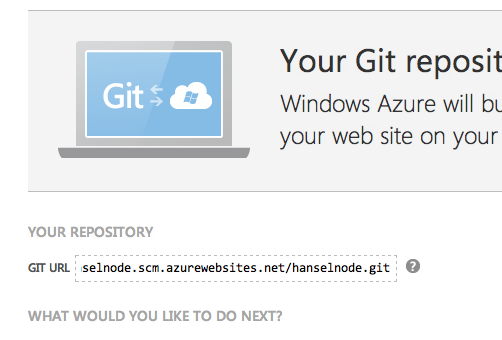
Then I'll setup a git repository along with a name and password for deployment.
My git repository is ready
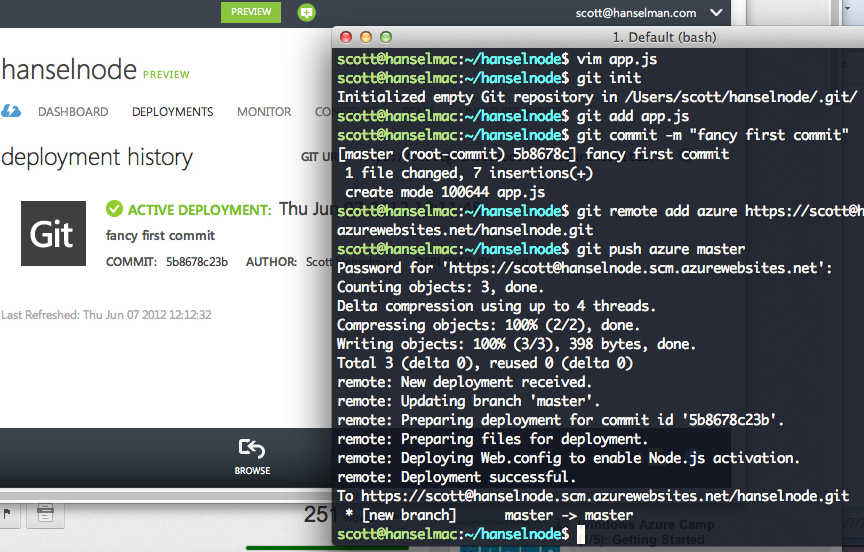
I'll make a folder, put an app.js in there, initialize the git repo, add "Azure" as a remote repo, and then push. The Azure management site actually notices the push and automatically refreshes without me having to do anything.
I just deployed my node app with git to Windows Azure
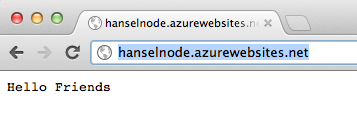
Boom, website in the cloud, easy as it should be.
image
Check out the YouTube video I did (embedded above also) on how to do the same thing with .NET and Visual Studio. You can use Web Deploy as I do in the video, Git, TFS or FTP. For example, I can use TFS and do Continuous Deployment if I like.

Virtual Machines

Azure has durable Virtual Machines (VMs) in the cloud now as well. You can make your own image and upload it or you can use a gallery of images that includes not only Windows but also Ubuntu, CentOS and SUSE images.
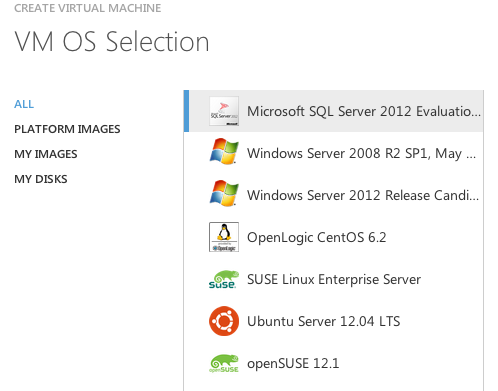
Linux on Azure. It's freaking me out.

Web Sites

You can make a web site in Azure yourself in a minute. You can make up to 10 small websites for free to play and experiment and then later reserve instances and scale up.
NOTE: To start using Preview Features like Virtual Network and Web Sites, request access on the 'Preview Features' page under the 'account' tab, after you log into your Windows Azure account. Don't have an account?  Sign-up for a free trial here.
Maybe go try one out and create a new Web Site from the Gallery:
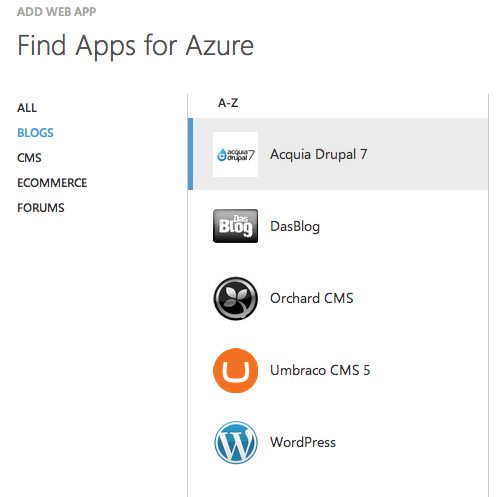
You can make a website quickly from the gallery
Feel free to publish in a number of ways as I mentioned, using Web Deploy, TFS, Git or FTP. You can manage everything in the portal or you can automate stuff from the command line.
I like that I have real choice. Use whatever tools I like, whatever OS I like to publish whatever apps I like talking to the backend that I like. I'm personally really happy with the way things are going and I'm looking forward to building all sorts of things with all sorts of tools on Azure.

Source:http://www.hanselman.com
Published By
S.G.Godwin Dinesh.MCA
Sr.System Administrator

Configuring a DHCP server static IP address

For certain types of servers, you must assign a static IP address and subnet mask during or after Setup. These servers include DHCP servers, DNS servers, WINS servers, and any server providing access to users on the Internet. It is also recommended that you assign a static IP address and subnet mask for each domain controller. If a computer has more than one network adapter, you must assign a separate IP address for each adapter.
To configure IPv4 for static addressing
  1. Click Start, click Control Panel, click Network and Internet, click Network and Sharing Center and then click Change Adapter Settings.
  2. Right-click the connection to which you want to add a static IP address and then click Properties.
  3. Acknowledge the UAC dialog and then double-click Internet Protocol Version 4 (TCP/IP/IPv4).
  4. Click Use the following IP address, and do one of the following:
    • For a local area connection, in IP address, Subnet mask, and Default gateway, type the IP address, subnet mask, and default gateway addresses.
    • For all other connections, in IP address, type the IP address.
  5. Click Use the following DNS server addresses.
  6. In Preferred DNS server and Alternate DNS server, type the primary and secondary DNS server addresses.
To configure advanced static IPv4 address settings for a local area connection, click Advanced.
To configure IPv6 for static addressing
  1. Click Start, click Control Panel, click Network and Internet, click Network and Sharing Center and then click Change Adapter Settings.
  2. Right-click the connection to which you want to add a static IP address and then click Properties.
  3. Acknowledge the UAC dialog and then double-click Internet Protocol Version 4 (TCP/IP/IPv6).
  4. Click Use the following IPv6 address, and then do one of the following:
    • For a local area connection, in IPv6 address, Subnet prefix length, and Default gateway, type the IP address, subnet prefix length, and default gateway address.
    • For all other connections, in IPv6 address, type the IP address.
  5. Click Use the following DNS server addresses.
  6. In Preferred DNS server and Alternate DNS server, type the primary and secondary DNS server addresses.
To configure advanced static IPv6 address settings for a local area connection, click Advanced.

Published By
S.G.Godwin Dinesh.MCA
Sr.System Administrator

You might not have permission to use this network resource windows xp and 7


To resolve this issue, set the value of the restrictanonymous registry entry to 0. To do this, follow these steps:
  1. Click Start, click Run, type regedit, and then click OK.
  2. Locate and then double-click the following registry subkey:
    HKEY_LOCAL_MACHINE\SYSTEM\CurrentControlSet\Control\Lsa
  3. On the right side, double-click restrictanonymous.
  4. Make sure that the value in the Value data box is set to 0, and then click OK.
  5. Close Registry Editor.
  6. Restart the computer.
Published By
S.G.Godwin Dinesh.MCA
Sr.System Administrator

Remote Server Administration Tools (RSAT) now available for Windows 8

Remote Server Administration Tools for Windows 8 includes Server Manager, Microsoft Management Console (MMC) snap-ins, consoles, Windows PowerShell cmdlets and providers, and command-line tools for managing roles and features that run on Windows Server 2012. In limited cases, the tools can be used to manage roles and features that are running on Windows Server 2008 R2 or Windows Server 2008. Some of the tools work for managing roles and features on Windows Server 2003.
After you do the installation Windows 8 will have some of them on the start screen for easy access. You’ll also see these tools added to the Administrative Tools folder (see the picture below).
Win8AdminTools
Interested?  Go get the appropriate architecture download package at http://www.microsoft.com/en-us/download/details.aspx?id=28972.  Be sure and read through the Systems Requirements and Important notes before installing.

Published By
S.G.Godwin Dinesh.MCA
Sr.System Administrator

.net session timeout settings in IIS6 on windows 2003 server

Does this sound simple web.config setup?
Nope this is way beyond that newbie configuration.

Problem: We were facing timeout issue on one of our servers. Web.config settings had no effect on the time out.

Note: In all screen shots pink color is hiding the actual server details.

Solution:
So here are some more interesting findings related to timeouts of sessions in IIS6 hosted on a windows 2003 server. You may need to change one or more of these setups in your server according to your setup.
There are totally 5 setups that influence your timeout. All of those are discussed here.
1. Web.config file of Application: First one to influence timeout is Session timeout setting in your we.config file.


Note: Web.config file is inherited to the subfolders and subfolders config settings take the precedence in case they exist.

2. Application session timeout in IIS:
Go to IIS, right click on the web application, go to properties. Go to Directory tab, click on Configuration button. Application configuration tab opens, click on Options tab as in the screenshot, you will find enable session state. Change the session time out period here.


3. Default website session timeout in IIS: Right click default web site under IIS and choose Home directory tab. Click on configuration button to open application configuration. Choose options tab and you will find Enable session state again similar to session state of each application. Enter higher session timeout period which will be application to all sites in the webserver.


4. Change Worker process idle timeout of application pool – Shutdown worker process after being idle for (time in minutes) – Default is 20 minutes. This setup is applied for all websites that use this application pool. To change this, Right click on the required application pool, choose Performance tab, and change the duration of idle time or uncheck the option so that the process is never recycled. You can also create an application pool, configure it, and use it for a selected list of web applications.


5. Change Recycle timeout period of application pool: Right click on application pool or default application, and choose Recycling tab. Change the “Recycle worker process (in minutes)” option to either change the period or disable the option by un checking. Un checking this option may be a good idea from performance point of view.


And finally there is a last one in machine.config file. But that does not affect any of these configurations and these setups take the precedence.

 Published By
S.G.Godwin Dinesh.MCA
Sr.System Administrator

If malware authors ever learn how to spell we're all screwed - the coming HTML5 malware apocalypse

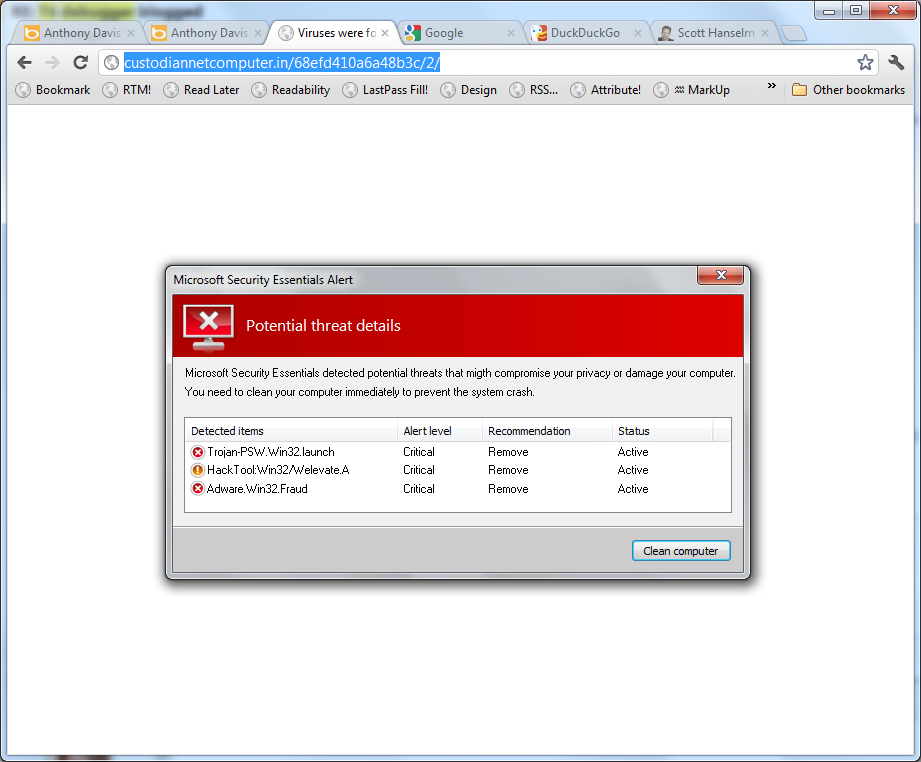
Forgive the lousy screenshot and transparency in the title bar, but I just got this fake virus popup while searching for an image. I admit for a single moment my heart jumped.

A very scary fake virus popup

Then I thought after a few seconds as a techie (and note that all these observations just happened all at once in my head in no order):
  • The dialog is perfectly centered in the browser. I'm not sure why this was my #1 tipoff, but for me, it was the first thing I noticed.
  • This "popup" was as a result of a browser navigation. If it were legit I'd expect it to happen a little more asynchronously.
  • The word "migth" misspelling in the popup.
  • The fonts in the column headers are anti-aliased with one technique and the rest of the text doesn't  use ClearType while my machine does.
  • Poorly phrased English: "You need to clean your computer immediately to prevent the system crash."
  • There's no option other than "Clean computer." No ignore, repair, quarantine.
  • The word "computer" at the end of the first line goes too far to the right of the grid's right margin. It should have wrapped to the next line. Yes, I'm a UI nerd.
  • Their Aero theme color is GRAY and mine is BLUE.
  • Ctrl-Scroll ZOOMs the image. ;)
  • The URL is obvious nonsense.
  • Adware.Win32.Fraud? Seriously?
It's scary just to look at floating in your webpage there isn't it?
A scary fake virus popup
How is my Mom supposed to defend against this? Windows OR Mac (or tablets) the bad guys are out there, and one day they will finally learn English and put a little work and attention to detail into these things.
One day these things won't be "selectable" to prove to us that they are HTML:

I selected the virus to make it invert its colors to prove it's fake

As we enable HTML5 with local storage, geolocation, possibly native code and  and other features the bad guys will start doing the same with their malware. If you can write Doom in HTML5 there's nothing (except the skill and the will) to keep you from writing adware/scareware/malware in JavaScript. Not just the standard CSRF/XSS type JS - which is bad, I know, I used to be in banking - but sophisticated duplicates of trusted software accurately recreated entirely in HTML5/CSS3 and today's modern JS.
Google Offline Mail and extensions run in the background in my browser now, what's to say some future malware won't? Should we digitally sign HTML5 apps? Do more Extended Validation SSL Certificates? How do you defend against this?
What do you think, Dear Reader?

Published by
S.G.Godwin Dinesh.MCA
Sr.System Administrator

RELEASED - Download Internet Explorer 10 for Windows 7

Just about a month ago the IEBlog published a post to allow business to manage the update schedule for Internet Explorer 10. It says "this approach lets organizations control when they are ready to deploy IE10 to their Windows 7 users." I took from this that IE10 on Windows 7 was imminent.
Today it's out. You can download IE10 for Windows 7 now. The details are over at the IE blog.
In the next few weeks and months Windows 7 machines will get automatically upgraded to IE10. For Web Developers like me, that means that between Windows 8 which already has IE10 and all these Windows 7 users who will now have IE10, that more people will have a modern browser than ever before.
 IE10 for Windows 7


IE10 was faster on my machine than IE9, and they say it is smarter about battery life. It also has IE10's upgraded JavaScript engine and includes spell check with auto-correct (finally!). Benchmarks are benchmarks but SunSpider implies about 40% faster than IE9, while PeaceKeeper looks like 25%. The V8 benchmark looks more like 100% faster. Point is, it's faster. How much faster? Depends on who you ask. Your mileage and machines will vary.
Once you've upgraded to IE10, go check out some of these sites. Be sure to view the source!
  • http://ie10bethethief.com - Robert Kirkman from Image Comics (You know him from The Walking Dead) also has a great comic I get each month on Comixology called Thief of Thieves.
    • This new site for Thief of Thieves not only has some great art (lots of SVG!) but also is a good example of using touch and the W3C Pointer Events standard. According to the IE blog, it also uses:
      • CSS3 animations for some of the larger scene transitions on the site
      • MSGesture API for handling more advanced pointer interactions like the safe cracking exercise
      • pageVisibility API to detect when an open page isn’t being actively used so we can control audio appropriately
      • setImmediate API to improve performance and power consumption on tablet devices. SetImmediate, like setInterval and setTimeout, is a timing API and requests the CPU to process the instruction as soon as it’s possible to.
  • Atari Arcade - Lots of classic Atari games, remade using HTML5 and Touch on the web.
  • Pulse - Very cool news aggregator done entirely in HTML5 with support for swipes and multi-finger gestures. Also works nice on mobile phones with responsive design.
  • Contre Jour - The 2011 iPad game of the year is now written in HTML5/JavaScript and CSS3. It works really well on touch systems like my Ultrabook. This originally came out in October but they've just added 20 new levels and it's free!
ie10onwindows7-2


  Developers

Source:
http://www.hanselman.com/

Published By
S.G.Godwin Dinesh MCA
Sr.System Administrator